
SafeTouch Orlando: Choose Between Video-Only and Connected Home Security
By Blue Storm Security · 2026.10.20 · 4 min read
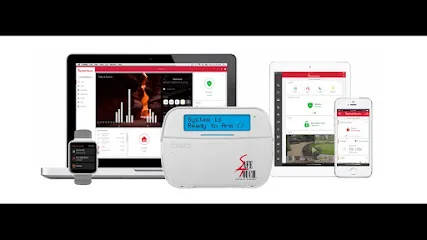
A camera system and a connected home-security system solve different problems. A camera can provide recorded or live video; an alarm setup can add entry detection, alerts, and monitoring. SafeTouch’s Orlando location page describes options in both categories, including a video-only plan and packages that combine security features with smart-home controls. The useful decision is not which package sounds fullest, but what the household needs to see, detect, and manage.
Start with the event the system should address
Before comparing equipment, identify the situations that matter at the property. Is the priority reviewing the front door after a delivery, checking a garage remotely, receiving notice when a window opens, or having an alarm event routed for a response? Those goals point to different combinations of cameras, sensors, controls, and monitoring. A list of devices without a defined purpose can leave important blind spots, even when the system appears feature-rich.
SafeTouch’s Orlando page describes indoor, outdoor, and doorbell cameras, with features such as night vision, video analytics, and live viewing and alerts. It also describes door and window sensors that send notifications when an entry point opens. These are distinct functions: video can help a user review a scene, while an entry sensor reports a change at a protected opening. Ask which specific devices and notifications are included in the proposed design and which require an added service or plan.
Compare SafeTouch Vision with an alarm package
The published Orlando package descriptions distinguish SafeTouch Vision as a video-only option, with remote video access, video storage, and AI deterrence. The page presents other packages as broader security-system options; Essentials is described as including remote arming and monitoring, while higher-level descriptions mention added video or smart-home features. Treat these as starting points for a conversation, not as a complete specification for a particular home.
Ask the installer to show what happens in a real scenario. If a camera detects activity, does the household receive a notification, is a clip saved, or does the event connect to an alarm response? If a door sensor opens while the system is armed, what alert or monitoring process applies? Get the answer in writing, including whether camera recording, video storage, monitoring, and any response service are included, optional, or dependent on other equipment. Do not assume that video visibility means an alarm has been triggered or that a camera alone brings a response.
Make smart controls fit household routines
SafeTouch also describes smart locks, garage-door controls, and home automation alongside its home-security systems. Those features may be relevant when residents want to manage access or check a garage status remotely. But “smart” controls introduce practical questions about who has permissions, how temporary access is handled, and what remains usable if internet or power is unavailable. The official page mentions an emergency power source among plan inclusions; ask which selected components it supports and for how long rather than assuming every device behaves alike during an outage.
Walk through ordinary routines when discussing access control: family arrivals, visitors, deliveries, and the times a garage door is typically used. Clarify whether the proposed setup gives each person a separate credential, how access can be changed, and whether door locks or garage controls work with the equipment being quoted. These questions help separate a useful integration from a feature that looks convenient in a product description but does not fit the way a household operates.
Check camera coverage and system boundaries
For each proposed camera, ask what area it is intended to show and what detail should be recognizable in the resulting footage. A camera aimed at a broad driveway may provide context without capturing a clear face at the entrance. Discuss lighting, likely viewing angles, privacy-sensitive areas, recording and storage terms, and how users retrieve clips. SafeTouch’s page describes high-resolution cameras and night vision, but the exact result depends on the selected equipment and placement; request a site-specific explanation instead of relying on feature labels alone.
Likewise, ask which doors and windows receive sensors and whether motion detection is part of the design. Clarify whether the system can be armed in a mode that allows people to move inside while selected perimeter points remain protected. Confirm how alerts are delivered and who can change settings. These scope details make proposals easier to compare than package names by themselves.
Resolve the local details before scheduling
The SafeTouch location page identifies its Orlando-area office at 369 Anchor Rd. #1201, Casselberry, FL 32707 and displays weekday hours of 8 a.m. to 6 p.m. A local business listing classifies the provider as a Smart Home Security Installer, gives the number +1 888-218-4719, and links to safetouchorlando.com. The official location page displays a different phone number, so confirm the current contact route and appointment arrangements directly before relying on either listing.
For a useful consultation, bring a simple property sketch, identify the entrances and camera views that matter, and ask for a written scope separating equipment, installation, storage, monitoring, and optional smart-home functions. Verify current package terms and the exact response process. That makes it possible to judge whether a video-only arrangement or a connected alarm-and-camera system better matches the household’s actual needs.
More from the watch log
Vector Security in Fort Lauderdale: Scope Cameras, Access Control, and Alarm Monitoring
Use Vector Security’s Fort Lauderdale-area service details to prepare a focused security-system conversation about video, entry control, mo…
Security Guides
Helios Security Systems in Miami: Choosing Between CCTV, Alarms, and Smart Controls
Helios Security Systems lists CCTV, alarm systems, access control, and smart-home controls in Miami. Use this guide to define a project and…
Security Guides
Security Center USA in Jacksonville: Decide What Smart-Home Security Needs to Do
A practical way to assess Security Center USA for a Jacksonville security project: define the job for connected devices, cameras, alarms, a…