
SafeTouch of Savannah: Compare Video-Only and Alarm-Linked Security
By Blue Storm Security · 2026.10.15 · 4 min read
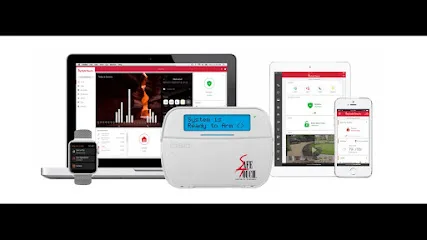
Security shoppers in Savannah may be comparing two different needs: seeing what is happening at a property and building a connected alarm system around its entrances and routines. SafeTouch’s Savannah location page describes both video-focused and broader residential options, making the useful first decision less about choosing a package name and more about deciding which functions must work together. The location record identifies the business as a Smart Home Security Installer, while the published page covers cameras, alarms, and connected controls.
There is also a geographic detail worth keeping straight. SafeTouch’s Savannah page gives its address as 3766 US-17 Suite 204, Richmond Hill, GA 31324, rather than an address in Savannah proper. The distinction matters when a customer is confirming where the local office is or asking whether a particular property is within the service area; the address alone does not establish service coverage. Before arranging a visit, describe the property location and confirm the available installation options directly.
Decide whether the project needs video alone or an alarm system
The official page describes a Vision package as video-only, with remote video access, video storage, and AI detection. That is a different project scope from a system built around door or window contacts, motion detection, and a security panel. If the primary goal is checking a front entrance or reviewing footage, a video-only design may be the relevant comparison. If the goal also includes detecting an opened entry or movement inside, ask how those devices and the alarm panel would be specified.
These functions should not be treated as interchangeable. A camera can provide visual information; an alarm sensor can report a defined event. A buyer comparing them should write down the events that matter—such as a door opening, motion in a selected area, or a person approaching a camera—and identify which device is intended to detect each one. This makes it easier to compare proposals without assuming that every camera triggers an alarm or that every alarm includes video verification.
Use the package differences to test the system design
SafeTouch’s published residential options offer concrete points for a scope conversation. The Essentials description names window contacts, motion detectors, and a security panel. The Enhanced description adds a two-way voice-control panel, crash-and-smash technology, and lighting and climate control. The Ultimate description includes smart-home automation and remote video access alongside the Enhanced features. Those published distinctions can help a homeowner identify what to ask about, but the page does not replace a property-specific equipment list.
For each proposed component, ask where it will be installed, what event it detects, and how it communicates with the rest of the system. For connected lighting, locks, or climate controls, clarify which devices are included and whether routines are configured as part of the work. If the property already has equipment, list its make and model where available and ask whether it can be retained or must be replaced. A useful written scope names the devices, locations, and intended actions instead of relying on broad labels such as “smart home.”
Plan camera coverage around the footage a household needs
The Savannah page describes indoor and outdoor security cameras, night vision, motion alerts, and cloud-storage or local-recording options. It also mentions doorbell, outdoor, and indoor cameras, with live viewing and recorded-footage access. These details suggest several decisions to settle before selecting a camera count: which approach or room matters, whether a view should cover a doorway or a wider area, and how long useful recordings need to remain accessible.
Ask how camera placement handles the actual sightlines and lighting at the property, and whether motion alerts can be narrowed to useful activity. Clarify whether storage is cloud-based, local, or offered in both forms for the proposed package; do not assume the same retention or access terms apply to every configuration. If cameras are meant to support an alarm event, ask what information is available to the monitoring service and what the system does when video or network access is unavailable.
Confirm monitoring, access, and the details of the inquiry
The published page refers to monitoring as part of its package descriptions, but a buyer should confirm the exact monitoring arrangement, associated terms, and how alarm events are handled for the selected plan. The same applies to remote locks and garage-door controls mentioned on the page: ask which hardware is supported, how individual access is managed, and what notifications or records are available. These are practical design questions, not assumptions that every listed feature is included in every installation.
There is a contact detail to verify before calling. The current place record lists +1 888-354-8960, while the official Savannah page excerpt displays other phone numbers, including 1-888-895-7233. Because the numbers differ, confirm the correct current contact through the official SafeTouch Savannah page before relying on either listing. A focused inquiry can then state whether the property is in Savannah or nearby, whether the request is video-only or alarm-linked, and which existing devices should be considered. That information gives the discussion a concrete starting point without presuming a package, service area, or equipment configuration.
More from the watch log
Which Home Security Sensors Should You Install First?
Prioritize the doors and windows that matter most, then decide whether motion or glass-break detection fills a real gap in your home securi…
Security Guides
Where Home Security Cameras Do the Most Useful Work
Plan camera placement around the approaches and entries you need to see, then check framing, lighting, and motion detection in real conditi…
Security Guides
How Renters Can Improve Home Security Without Permanent Installation
A renter-friendly security plan starts with reversible changes, visible entry points, and portable devices chosen for a clear purpose and e…