
Helios Security Systems in Miami: Choosing Between CCTV, Alarms, and Smart Controls
By Blue Storm Security · 2026.10.18 · 4 min read
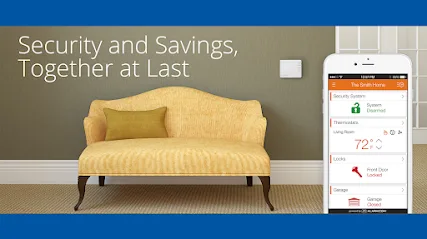
Security-system planning gets easier when a project is defined by the decisions it needs to support, rather than by a shopping list of devices. Helios Security Systems describes security camera and alarm services for residential and commercial customers in Miami and South Florida, alongside CCTV, access control, and remote smart-home controls. Those offerings create several possible project paths, but a useful comparison starts with the property’s specific need: seeing an area, detecting an event, managing entry, or combining those functions.
Choose the first job: video, alarm detection, or entry control
CCTV and an alarm system answer different questions. Cameras can provide recorded video for a selected area; an alarm system is intended to signal a defined event. Helios describes CCTV for homes and businesses and says its camera installations can provide video surveillance. Its website also describes burglar and fire alarm systems. A property owner should therefore decide whether the main concern is visibility, detection, or both before comparing equipment.
Make the need concrete: identify the doorway or area involved, when it needs coverage, and what the system should do when an event occurs. If video matters, ask which locations can be covered and how recordings are retained and accessed. If an alarm matters, ask which sensors are included and what happens after an alarm signal. These questions keep “security system” from becoming an indistinct bundle of cameras and devices.
Translate the camera resolution claim into a design question
Helios’s website describes high-definition security cameras ranging from 1080 to 4K and above. That range is a useful starting point, not a complete specification for a particular property. Resolution alone does not establish what a camera will capture from a proposed mounting position or how usable recorded footage will be in changing light. Ask for the proposed camera locations, the areas each view is intended to cover, and the recording arrangement.
For a home, the priority might be a few entry points; a business may need to consider several doors or shared areas. The right scope depends on the layout and intended use, not just on selecting the highest resolution listed. A written equipment proposal can clarify whether each camera is intended for live viewing, recorded review, or both, and what storage or remote-access components are included.
Keep remote controls and access control distinct
The company’s website describes remote control of connected home features, including security, door locks, CCTV, lighting, and thermostats. That is broader than simply viewing a camera on a phone. Before choosing an integrated setup, list which functions should be controlled remotely and which household members or staff need access. Ask what equipment must work together, how user permissions are managed, and what happens to local controls if internet access is unavailable.
Access control deserves its own scope. It concerns who may enter and how permissions are administered; it is not interchangeable with camera coverage. For a business, clarify which doors are in scope and who will manage access changes. For a residence, identify the entry points and users that need to be included. The official site mentions access control and smart-home functions, but a specific project proposal should spell out the included devices and configuration.
Verify what alarm monitoring means for the project
Helios’s official website advertises 24/7 alarm monitoring and describes alarm systems for residential and commercial properties. Monitoring is an important decision point, but a general website statement does not resolve the terms of a particular account. Ask whether the proposed alarm system includes monitoring, what events are covered, whether a separate agreement or recurring charge applies, and how contacts and response procedures are set up. Also establish how the system communicates an alarm and what the customer should expect if a connection is interrupted.
The website also lists fire-alarm-related offerings, including smoke detection and central-station monitoring. A customer considering fire detection should request a clear description of the specific system and services proposed rather than assuming every fire-related feature is part of a standard security package. Confirm relevant inspection or documentation needs directly for the property and project.
Use the Miami listing to make the next conversation specific
Helios Security Systems is listed as a Smart Home Security Installer at 6815 SW 81st Ter, Miami, FL 33143. Its listed phone number is +1 305-723-1880, and the company website is heliossecurity.com. These details provide a practical starting point for an inquiry, not confirmation of current availability, pricing, or the scope offered for a particular address.
When contacting the company, describe whether the project is residential or commercial, name the system function that matters most, and note any existing cameras, alarms, locks, or connected devices that may affect the design. Request a written scope that separates equipment, installation, remote-control features, and any monitoring terms. Comparing those specifics will make it easier to judge whether a proposed CCTV, alarm, or smart-control setup actually fits the property.
More from the watch log
Security Center USA in Jacksonville: Decide What Smart-Home Security Needs to Do
A practical way to assess Security Center USA for a Jacksonville security project: define the job for connected devices, cameras, alarms, a…
Security Guides
Georgia Carolina Security in Augusta: Match Cameras, Alarms, and Smart Locks to the Property
A practical way to assess Georgia Carolina Security’s residential and business security options in Augusta is to map each device to a speci…
Security Guides
SafeTouch of Savannah: Compare Video-Only and Alarm-Linked Security
SafeTouch’s Savannah page distinguishes video-only surveillance from alarm and smart-home packages. Use that split to define coverage, cont…