
PoE or Wi-Fi Cameras? Choose by Power, Cabling, and Network
By Blue Storm Security · 2026.11.13 · 4 min read
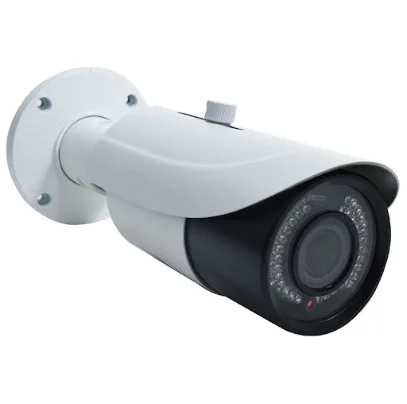
Choose Power over Ethernet (PoE) cameras when Ethernet can reach the camera locations and you want one cable to carry both network data and power. Choose Wi-Fi when Ethernet routing is impractical and the location has dependable wireless coverage plus a way to power the camera. A battery-powered Wi-Fi model removes the need for a nearby outlet. The practical answer often differs from one side of a house to another, so assess each camera position instead of choosing by product label alone.
Know what “wireless” actually means
PoE describes how a camera receives power and communicates with the network: a single Ethernet cable runs between the camera and compatible network equipment, carrying both. The camera itself is not untethered; it depends on a physical cable route. That route can be straightforward when there is access through an attic, basement, utility space, or an unfinished wall, and more involved when a finished space must be crossed.
Wi-Fi describes the camera’s data connection, not necessarily its power source. A plug-in Wi-Fi camera sends video over the wireless network but still needs an outlet and a power cord at or near its mounting location. A battery Wi-Fi camera avoids that nearby outlet, though it still needs a usable wireless connection and a plan for recharging or replacing its battery. These differences matter outdoors and at high mounting points, where getting to an outlet or taking a camera down may be inconvenient.
For example, a camera aimed at a front entry might have a practical route through an accessible ceiling, making PoE attractive. A detached shed or a finished hallway may be difficult to reach with Ethernet; if Wi-Fi coverage and power are available, a plug-in model may fit better. If there is no convenient outlet, battery operation may be an option.
Match the system to the cable and power route
Walk the proposed cable path, not just the straight-line distance from the camera to a router. A camera may be physically close to network equipment while separated by finished floors, masonry, or spaces with no easy cable access. Conversely, a location farther away may be easy to wire during renovation or through an accessible service area. PoE makes sense when the route can be run cleanly and the network side has equipment designed to provide power over Ethernet.
Compare the options by what each location can support:
| Camera type | At the camera | Main practical trade-off |
|---|---|---|
| PoE | Ethernet cable | Requires a workable cable route and compatible power/network equipment |
| Plug-in Wi-Fi | Outlet and Wi-Fi | Avoids Ethernet routing but needs local power and wireless coverage |
| Battery Wi-Fi | Wi-Fi | Needs neither Ethernet nor an outlet at the camera |
Power access can settle a close call. An outlet behind furniture or far from a planned mounting point may not be a useful source if reaching it requires an awkward exposed cord.
Check the network where each camera will go
Test Wi-Fi at the actual mounting spots. A phone showing a strong connection in the living room says little about a camera mounted beyond several walls or near a building’s exterior. Distance, walls, and other obstructions can weaken the signal. Check the intended location with doors in their usual positions and from the side of the wall or window where the camera will sit. A marginal signal at the spot can mean unreliable video communication, even if other devices work well elsewhere in the home.
PoE avoids the camera’s wireless hop to the local network, which can be useful where Wi-Fi is inconsistent. It does not mean every system function is independent of connectivity: remote viewing or cloud features may still rely on the home network and internet, depending on how the system is designed. Think separately about the camera-to-network connection and the system’s route to a phone or remote service. They are related, but they are not the same connection.
Make the choice camera by camera
For each planned view, write down three conditions: can Ethernet reach the location, is a suitable outlet available, and is Wi-Fi reliable at the mounting point? The answers narrow the choice without requiring every camera to use the same connection.
- If Ethernet routing is practical and the system has compatible PoE equipment, PoE is a direct fit.
- If Ethernet is difficult but an outlet and reliable Wi-Fi are both available, consider plug-in Wi-Fi.
- If Ethernet and a convenient outlet are both unavailable, battery Wi-Fi may fit if Wi-Fi is reliable at the mounting point.
A mixed arrangement can make sense when an easy-to-wire entry and a hard-to-wire outbuilding have different constraints. Before settling on one, check whether the recording and viewing system supports the intended combination of cameras. Atlanta readers can find the address and phone number for Atlanta Security Camera Installation.
More from the watch log

Local, Cloud, or Both? Choosing Storage for Home Security Cameras
Compare local and cloud camera storage by outage behavior, retention, and clip access to choose the setup that fits how you use security fo…
Security Guides
Master Keys or Electronic Access? Choose by How Often Permissions Change
Compare master-key systems with electronic access control by staff turnover, door permissions, credential types, and the practical conseque…
Security Guides
Why Does a Home Security Alarm Keep Going Off?
Repeated alarm events are easier to solve when you identify the triggering sensor, connect its timing to a routine or physical change, and…