
Safeguard Security & Surveillance Inc (Windsor Locks, CT): Decide the Right CCTV, Alarm, and Access Control Scope for Your Property
By Blue Storm Security · 2026.06.15 · 4 min read
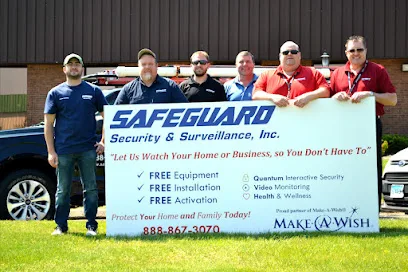
Choosing a security system installer is rarely about finding the “most cameras” or the loudest alarm. For Safeguard Security & Surveillance Inc in Windsor Locks, Connecticut, the smarter question is whether their proposed security, CCTV, alarm, and access control scope matches your actual property layout and day-to-day movement. Their public listing data points to smart-home integration, CCTV camera installs, alarm monitoring, and access control—so the conversation should focus on how those pieces work together, not whether you “buy everything.”
If you’re calling about a system at 1 Corporate Dr, Windsor Locks, CT 06096, you can use the checkpoints below to decide whether their plan fits your specific risk and response workflow. The goal is simple: after an event triggers, you want identification you can act on, and permissions that reduce mistakes.
Start with the outcome you need after an alarm or detection
Before anyone quotes equipment, clarify what success looks like. For example: do you need footage that can identify a person at your main entry in low light? Do you need a door-prop event that reliably alerts you when someone tries an unauthorized entry route? For access control, do you want time-limited codes for staff or contractors, or a controlled process for after-hours access?
Match alarm verification to how you respond
Two systems can both have alarms on paper, but the difference is the workflow: what happens first (notification, verification, contact), and how you confirm it’s a real event. When Safeguard proposes alarm monitoring, ask how the system distinguishes false triggers (pets, moving trees, HVAC cycles) from true alarms and how that affects your notifications.
Choose CCTV for identification, not just recording
CCTV value comes from identification. That means the camera placement and settings have to align with your sightlines. A common failure mode is mounting a camera where it “covers” an area but can’t capture faces, license plates, or approach paths clearly.
When discussing a quote with Safeguard, use these decision prompts:
- Where do people actually approach? If your driveway curves or your front walkway is partially blocked, you may need adjusted angles or additional coverage.
- What lighting conditions will you face? Ask about night performance and whether the plan addresses glare, reflections, and shadows.
- What resolution and frame rate are promised for key zones? The spec matters most on entrances and choke points.
Plan access control so it reduces entry mistakes
Access control should support your “who gets in, when, and how they get in” rules. Safeguard’s public positioning includes access control and smart-home integration signals, so the installer should be able to translate your real permissions into the system’s capabilities.
Confirm permissions match your staff and contractor patterns
Ask what happens when someone no longer needs access: can permissions be updated quickly, and does the system support temporary authorization? For example, if you have rotating employees or weekend contractors, time-bound access codes can help you avoid the classic problem of forgotten credentials.
Make sure the system architecture ties together (security + video + permissions)
The most effective installations integrate alarms, CCTV, and access control into one operational story. If you’re installing a camera and also managing doors or gates, ask how the system connects an event to the relevant footage or access logs.
For instance: if a door sensor triggers and someone enters using the wrong permission route, can you immediately see the relevant camera view and the access attempt details? This is where smart-home integration should be more than a convenience label—it should help you monitor, verify, and respond with fewer steps.
Verify the scope before you commit
Because public information about Safeguard’s exact installation process is limited, use the call to confirm the practical details that determine whether the job will match your expectations. When you reach out, you can reference +1 860-758-5555 and their site http://www.safeguardssinc.com/ (available as a starting point for your research), then verify:
- Who performs the installation and configuration for alarm monitoring and CCTV.
- How they plan camera locations against your real sightlines and lighting.
- Whether their access control approach fits your entry routes and permission rules.
- What’s included in system setup (accounts, app access, user permissions, and basic training).
When you align CCTV identification, alarm verification, and access control permissions before signing, you avoid the most expensive mistake: a system that looks comprehensive but doesn’t support the decisions you have to make during a real event.
More from the watch log

ProTec Security Systems in Greenville: Plan Around the EMC Transition
ProTec Security Systems’ Greenville listing now points to EMC Security. Here is how to clarify system support, camera needs, and the right…
Security Guides
Priority One Security in Greenville: Make Smart-Home Security Work as One System
Priority One Security’s Greenville listing and service menu point to a practical planning question: how should cameras, alarms, access cont…
Security Guides
On Point Security & Video in Greenville: Scope Cameras, Alarms, and Entry Control
On Point Security & Video lists surveillance, intrusion systems, access control, and data infrastructure. Here is how Greenville property t…