
On Point Security & Video in Greenville: Scope Cameras, Alarms, and Entry Control
By Blue Storm Security · 2026.10.10 · 5 min read
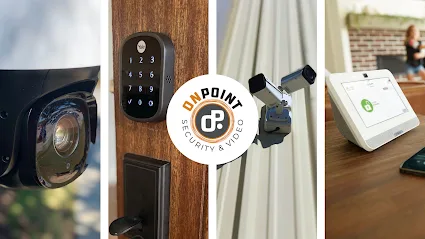
A camera project can begin with a simple request—cover the front entrance—but quickly raise harder questions. Should an alarm respond to the same event? Who needs permission to enter after hours? Will staff review footage remotely, or only after an incident? For Greenville property owners weighing those choices, On Point Security & Video’s published service mix makes system coordination a useful planning focus: its website lists video surveillance, intrusion systems, access control, and data infrastructure alongside residential security offerings.
Define the event before selecting equipment
Start by describing what the system should help someone notice or do. A small business might need to see a delivery entrance, receive an alert when a protected area is opened, or limit access to a staff-only room. A homeowner may be more concerned with a doorbell camera, a notification at an entry, or controlling a lock remotely. These are different jobs; adding devices without ranking them can make a proposal harder to compare.
Write down the locations, times, and people involved in each concern. For example, “review the rear receiving door after closing” is more actionable than “add cameras everywhere.” On Point’s commercial service page describes video surveillance for remote or on-site review, while its residential pages separately list home security cameras and home automation. Those descriptions identify available categories, not a promise that any particular configuration will fit every property. The site assessment and written scope should connect each proposed device to a stated use.
Keep video, alarms, and access control distinct
These systems can address related events, but they do not answer the same question. CCTV or video surveillance can provide a view or recorded context; an intrusion alarm is intended to signal a defined alarm event; access control governs who can enter through selected doors. On Point’s website lists all three areas, including access options such as PIN codes, biometrics, fobs, and cards. That list gives a property team concrete alternatives to discuss, not a reason to assume all options suit every door or user.
Ask the installer to identify which doors receive controlled entry, what credential types are proposed, and how access is added or removed when staff responsibilities change. For video, specify the view needed and how an operator will retrieve it. For alarms, clarify the protected zones and what happens when a signal occurs. A proposal that separates these functions makes it easier to see whether a camera is being asked to solve an access problem, or whether an alarm is being treated as a substitute for reviewable video.
Make remote use and infrastructure part of the scope
Remote viewing and app-based controls depend on more than the camera or lock itself. Before approval, ask which users can access the system, what each user can change, and what network or data infrastructure the design requires. On Point lists data infrastructure as part of its security offerings and describes home automation such as remote control of connected devices. The relevant question is how those pieces apply to this site: which functions are included, what depends on an internet connection, and what remains available if connectivity is interrupted?
For a business, also identify who is responsible for reviewing alerts and footage during ordinary operations. For a home, decide which household members need app access and whether connected locks or thermostats belong in the same project. Avoid treating “remote” as a complete operating plan. The written proposal should spell out user setup, basic training, and any dependencies the installer says are necessary.
Use the site visit to test the design assumptions
A useful site discussion should consider the actual doors, sightlines, lighting, cable routes, and daily routines—not merely a device count. Walk through the entry points that matter and ask where a camera view begins and ends. Check whether a proposed credential method works for the people who will use that entrance. If residential and commercial needs differ across parts of one property, ask that each use case be shown separately rather than hidden in a single equipment total.
On Point identifies its work as serving residential, commercial, and industrial clients, and its commercial design-and-plan section presents planning as part of its offer. Buyers can use that stated scope to ask how the assessment becomes a drawing, device schedule, or written list of included work. The company’s Greenville address is 153B Brozzini Ct, Greenville, SC 29615; the published phone number is +1 864-712-0160. The official website is onpointsecuritysc.com. Confirm current service scope and project details directly rather than assuming an online service description settles site-specific questions.
Compare proposals by operation, not just device totals
Before choosing a design, compare the locations covered, the event each device addresses, access methods, remote-use assumptions, and any data infrastructure included. Note exclusions and ask how changes to users, credentials, or equipment are handled. If monitoring is relevant, distinguish the alarm equipment from the monitoring arrangement and confirm exactly what is included in the proposal; the company’s site advertises monitored alarm systems, but a buyer should verify the terms for the specific project.
A clear security scope lets an owner judge whether video, alarm, and access-control components work together for the intended routine. For On Point Security & Video in Greenville, the practical next step is to bring a short list of site-specific events and ask how each would be handled, documented, and supported after installation.
More from the watch log
How Renters Can Improve Home Security Without Permanent Installation
A renter-friendly security plan starts with reversible changes, visible entry points, and portable devices chosen for a clear purpose and e…
Security Guides
How to Evaluate a Commercial Security System Proposal
Compare a commercial security proposal by its stated outcomes, coverage, equipment flexibility, and provider responsibilities—not by device…
Security Guides
Professional Monitoring or Self-Monitoring: What Homeowners Should Compare
Compare who receives a home security alarm, how alerts travel during disruptions, and the ongoing costs and responsibilities of monitored a…