
HR Homefront Security in Chesapeake: Connect CCTV, Alarms, and Smart-Home Controls to the Property
By Blue Storm Security · 2026.08.20 · 4 min read
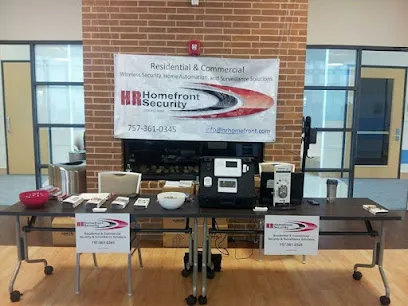
Choosing a security installer is easier when the conversation starts with the property rather than a device list. HR Homefront Security presents itself as a locally owned and operated provider serving residential and commercial customers, with wireless security systems, home automation, and surveillance cameras among its stated offerings. Its official website also says the systems can operate without an internet or phone line, a detail worth exploring when a property has unreliable connectivity or when cellular communication is part of the design.
Begin with the events the system must make visible
A useful site review should identify which events need an alarm, which need a camera, and which need both. A door or window contact may signal an opening, while CCTV can help verify what happened around an entry, driveway, side gate, or interior transition. Smoke detection is a separate life-safety consideration and should be discussed independently from theft protection. The goal is not to maximize camera count; it is to give each important area an appropriate detection and verification path.
For a Chesapeake home, that discussion can include the main entry, garage, rear approach, detached structures, and places where family members or pets move through the property. For a small commercial site, the same exercise may focus on employee entrances, customer-facing doors, stock areas, and after-hours access. HR Homefront’s published service mix includes residential and commercial wireless security, surveillance cameras, smoke detection, and smart-home functions, so the written scope should show which of those categories is actually included.
Wireless communication deserves a precise explanation
The company’s website describes a 2GIG-powered, Alarm.com-based wireless cellular security setup and states that no internet or phone line is needed. Those are concrete system claims, but they still need to be translated into project terms. Ask what communication path the proposed alarm uses, what happens during a power outage, how the system reports a lost connection, and whether the equipment or service contract has changed since the website content was published.
It is also important to separate local alarm operation from monitoring. A siren, app notification, cellular communicator, and professionally handled response are not interchangeable features. A proposal should identify who receives signals, what notifications the owner receives, what recurring charges apply, and what steps are expected after an alarm. If the project includes smart-home controls, ask whether convenience features share credentials or user permissions with the security account.
Camera placement should support review, not just coverage
Surveillance cameras are most useful when their view answers a defined question. Can the image show a person approaching the front door? Does a side camera capture the gate rather than only the wall? Can a commercial camera distinguish a delivery area from a public walkway? These decisions depend on mounting height, lighting, field of view, privacy boundaries, and the amount of recorded detail needed.
Request a simple camera plan that marks each viewpoint and explains its purpose. Night images, glare from Chesapeake’s bright outdoor conditions, foliage movement, and vehicles entering the frame can all affect usable footage. The installer should also explain recording duration, remote access, user permissions, and how footage is exported if an incident needs review. “More cameras” is not a substitute for a view that can actually identify or clarify an event.
Use the written scope to compare the installation fairly
Before scheduling work, compare proposals by equipment model, labor, wiring or mounting requirements, configuration, training, recurring monitoring, and exclusions. The official site lists HR Homefront Security at 841 Juniper Crescent, Ste 103, Chesapeake, VA 23320, and provides the phone number +1 757-361-0345. Those details give a customer a direct way to confirm current service area, availability, pricing, and the exact package being discussed; they should not be treated as a substitute for a current quote.
A final review should cover ownership of equipment, cancellation terms, warranty language, service response, account access, and what happens if the property changes hands. Ask for the assumptions behind any monthly figure and confirm whether smoke detection, smart-home automation, CCTV recording, and alarm monitoring are separate line items. A clear scope lets a homeowner or property manager judge fit without relying on broad promises.
Make the decision about system behavior
HR Homefront Security’s published capabilities point to a conversation about connected security: wireless alarm signals, camera evidence, smoke detection, and home-automation controls. The strongest next step is a property-specific assessment that documents detection points, camera views, communication, users, and response expectations. With those answers in writing, a customer can decide whether the proposed system matches the site and can compare it responsibly with other installers.
More from the watch log
How Renters Can Improve Home Security Without Permanent Installation
A renter-friendly security plan starts with reversible changes, visible entry points, and portable devices chosen for a clear purpose and e…
Security Guides
How to Evaluate a Commercial Security System Proposal
Compare a commercial security proposal by its stated outcomes, coverage, equipment flexibility, and provider responsibilities—not by device…
Security Guides
Professional Monitoring or Self-Monitoring: What Homeowners Should Compare
Compare who receives a home security alarm, how alerts travel during disruptions, and the ongoing costs and responsibilities of monitored a…